
Inventory
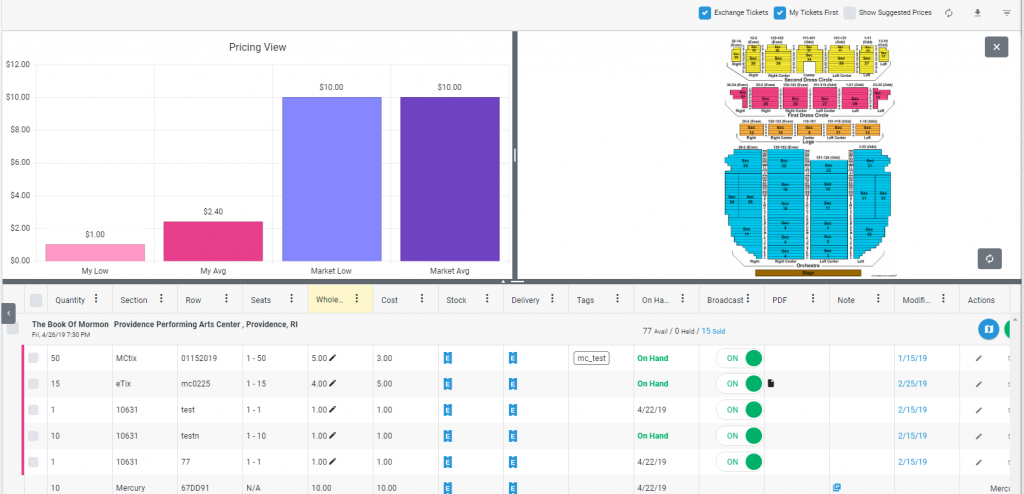
- Pricing View – When looking at event details, a pricing detail view is now available along with the map. It will update in real-time along with applied filters, including map filters.
- The Manage eTickets screen has been updated with controls to pan, zoom in and zoom out.
- Performance improvements with the barcode extraction moving to the background
- Added ability to add inventory ticket groups to an existing PO. This is also available from the existing Add Tickets screen.
- Users can now combine ticket groups, and quick-fill cost and wholesale with High, Average, or Low values.
Orders
- Added Ticket Request notes for fulfillment orders.
- Users can now add manual notes on fulfillment orders
All Grids
- Minimum width of columns have been lowered, allowing users to set up their preferred column displays more easily. Delivery Status columns are an exception, and have kept the same minimum width as before to prevent hiding the status change options.
- Enhanced the bulk select option in the upper left of each grid to be a “Select All,” directly calling the back-end. Users can now apply full filters and use Select All to choose every single result at once.
Purchase Orders
- Added ability to refund payments directly from the Purchase Order Detail View
Dashboard
- Added external partner links to the Dashboard
- Added “Unmapped Inventory” quick link when user has unmapped tickets in their inventory
Bugs/Other Fixes
- Fixed a scrollbar issues with “Fix Unmapped Inventory” workflow
- “Delete Tickets” bulk action was the wrong color
- Prevent the unbroadcasted inventory filter from showing past events
- Inventory wasn’t refreshing after attaching etickets
- Removed suggested pricing for exchange inventory
- Updated Customer list styling
- A limited version of the Manage eTickets screen is now available on Tablet devices