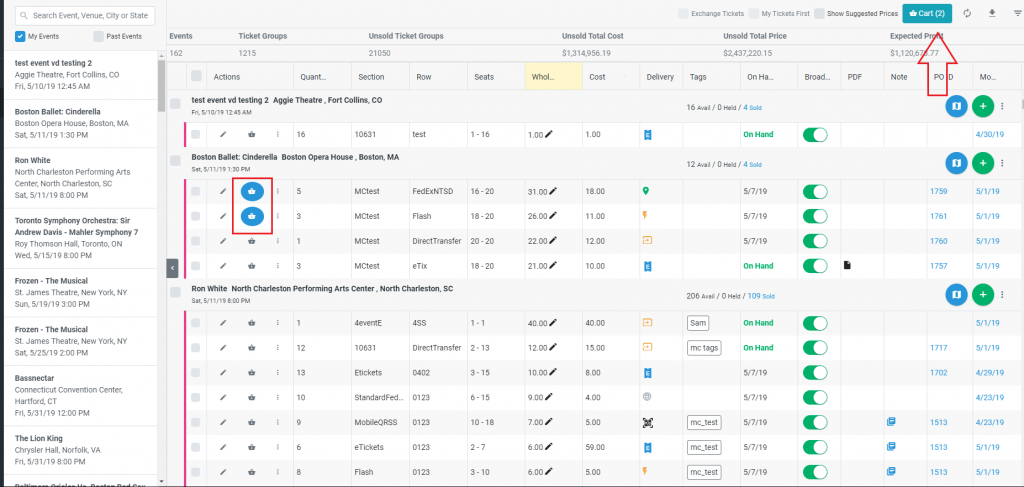
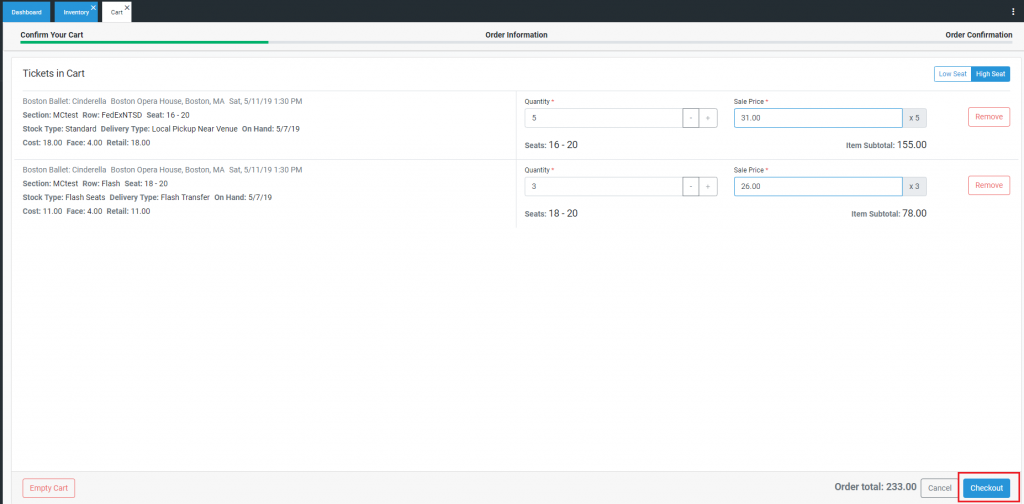
The POSNext’s “Sell” selector has been updated and now adds ticket groups to a Shopping Cart
The shopping cart can be used to sell single or multiple ticket groups at the same time
Ticket quantity and sale price can be edited from directly within the shopping cart
Each order contains a “Sell From Low/High Seat” selector which updates in real-time
Customer information and payment information will look similar to 1.0.
Note – tickets on hold cannot be added to the Shopping Cart.
Grids
New font size – Tiny. Fit more text into cells.
New cell height option – Tall. From the viewing options menu, Wide and Tall are now options that will trigger word wrap options on certain columns, to allow more data on the same screen. These include Order Date, Invoice Date, Event Name, Venue Name. Event Date, Delivery Method, Void Date, and Void Note
Invoices
The Invoice Details view has been updated to display multiple sold ticket groups.
Minor updates and bugfixes
Fixed an issue where no Order total was showing for TN Prime orders due to $0 fee.
Updated Internal Note passing in NULL value
Update PO Details Refund functionality that was causing an error