Adding Mercury tickets UI updated with “Confirm Purchase” and updated success message: “Tickets have been added to <event name>. Purchase order #xxx has been created. Attached eTicket PDFs should populate shortly.”
Orders
Changed status on Orders grid from Order status to Delivery status
Added ability to accept or reject orders
File uploader users can now edit the Delivery column in the orders grid
Order details indicates “Short” on short orders
Tapping event name in Order Detail view now takes you to the inventory for that event
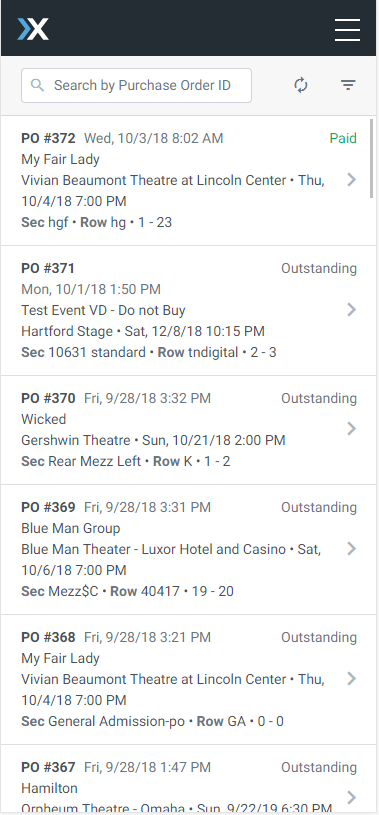
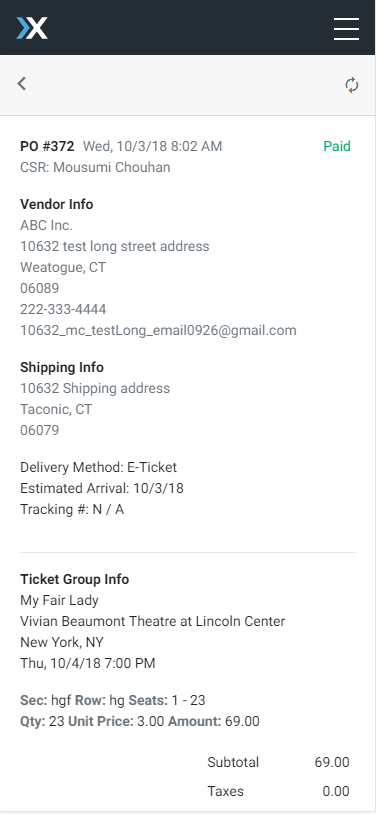
Purchase Orders View
Added Purchase Orders List view
Added Purchase Orders detail view
UI Enhancements
Add swipe right to close gesture to filter panel
Various UI bugfixes to improve consistency and handling across devices
Edit tickets screen now displays total number of tickets in ticket group
Bugfixes
Edit tickets now shows Primary and Near Term delivery from ticket group
Vacation mode toggle has been fixed and success messages are clearer
General Admission tickets now show N/A instead of dot and hyphen for seat numbers
Updated success messages and error handling for Mercury orders on mobile
Order list view was not loading due to an On Hand date error – this has been resolved